
In today’s Admin Tips post, we’ll check the tee program.
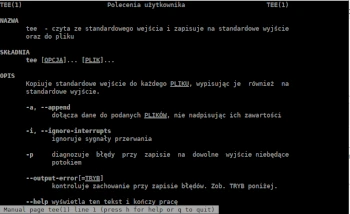
tee reads from standard input and writes to standard output and a file. It copies standard input to each FILE, also writing it to standard output.
The tee program is part of the coreutils package.
Options
-a, –append : appends data to the specified FILES without overwriting their contents
-i, –ignore-interrupts : ignores interrupt signals
-p : diagnoses errors when writing to any non-pipe output
–output-error[=MODE] : controls error logging behavior. See MODE below.
Syntax
[command] | tee [option] [file]
Examples
Writes command output to a file
uptime | tee myfile1
14:28:13 up 4:23, 2 users, load average: 0.12, 0.39, 0.66
To check if tee has passed the command output to a file, you can use the cat command:
cat myfile1
By default, tee overwrites the contents of an existing file. To prevent the file from being overwritten, meaning that the current file content is not deleted and replaced with the new one, you can use the -a option. In this case, the new data will be added to the selected file:
uname -a | tee -a myfile1
Linux ***** 6.0.0-4-amd64 #1 SMP PREEMPT_DYNAMIC Debian 6.0.8-1 (2022-11-11) x86_64 GNU/Linux
In this case, the file myfile1 now contains two pieces of information:
14:28:13 up 4:23, 2 users, load average: 0.12, 0.39, 0.66
Linux ***** 6.0.0-4-amd64 #1 SMP PREEMPT_DYNAMIC Debian 6.0.8-1 (2022-11-11) x86_64 GNU/Linux
If we want to notify all system users (as admin), we can save the command output in multiple files:
echo “December 31, 2025, there will be a system breakdown” | tee /home/user1/info /home/user2/info /home/user3/info
To hide the console information and output it to a file:
uptime | tee myfile1 >/dev/null
Ignore interrupts
To allow tee to exit properly even after a previous command has been interrupted, add the argument -i
[command] | tee -i [file]
For more information about tee, use the following commands:
tee –help
man tee
